Microsoft has released a video of what customers can expect from Windows 8.
I am excited by what I see in this video. Regarding the UI, I have a Windows 7 phone and the tile experience in Windows 8 seems to be an extension of the tile experience in my phone. Windows 8 seems to merge the touch and the traditional PC experience, in a sense giving an user best of both worlds - touch and productivity.
Saturday, June 4, 2011

Tuesday, March 29, 2011
Creating Fancy Intro Videos
www.vipidme.com allows you to create cool intro videos by allowing you to enter text in place of the familiar text you are most used to seeing.
If you wish to gain access to more features and functionality then you must be willing to loosen your purse strings. This is why the website allows you to first create sample videos for FREE before shelling bucks.
Above is a free video I creating in the process of checking out their website.
Cool concept …. which is why it’s made it to coolitrends.blogspot.com J
Sunday, April 25, 2010
Sidereel
I watch a lot of my favorite TV Shows on online websites like www.hulu.com. So it can be a little frustrating if I do not find what I am looking for on www.hulu.com. www.sidereel.com is the solution to my predicament.

It's consolidates links to various TV shows, which are viewable online, in this one neat website. You can also find data about movies, TV schedules and reviews in case they are of interest to you. As more and more TV shows become available online this website could gain popularity since it "just makes sense".

It's consolidates links to various TV shows, which are viewable online, in this one neat website. You can also find data about movies, TV schedules and reviews in case they are of interest to you. As more and more TV shows become available online this website could gain popularity since it "just makes sense".
Google Analytics
This is not a post by itself. Rather I am trying out Google's Analytics.
My post will be about my experience with using Analytics which looks quite interesting and promising.
My post will be about my experience with using Analytics which looks quite interesting and promising.
Monday, April 12, 2010
Orbitouch Keyless Keyboard
Orbitouch keyless keyboard has been around for a while. However, I came to know of it only recently and hence I decided to blog about it. It's a device which I thought was brilliant, creative and one which will be of great help to kids with autism. However, that does not mean it can't be used for regular users.
You can check out more videos of the Orbitouch keyless keyboard on http://orbitouch.com/videos. From the looks of it, it seems to perform everything which one could want to type with a regular keyboard. I wonder if it’s settings need to be changed when used for gaming purposes? Nevertheless it’s a very innovative concept which is practical and useful.
You can check out more videos of the Orbitouch keyless keyboard on http://orbitouch.com/videos. From the looks of it, it seems to perform everything which one could want to type with a regular keyboard. I wonder if it’s settings need to be changed when used for gaming purposes? Nevertheless it’s a very innovative concept which is practical and useful.
Sunday, March 28, 2010
Avoiding penalties when prematurely terminating cell phone service agreements
This is going to be a short post and not really a geeky one.
If your unhappy with the quality of service you currently get out of your cell phone service provider and you wish to change your cell phone provider without paying any penalty then you may do so by swapping your agreement on the website www.cellswapper.com
It also provides a place where you can get a 12 month contract.
Note: Fortunately I have never had to terminate my cell phone contracts prematurely and hence have never used the website myself. I would suggest checking out checking out reviews of earlier users of this website before swapping your agreement.
If your unhappy with the quality of service you currently get out of your cell phone service provider and you wish to change your cell phone provider without paying any penalty then you may do so by swapping your agreement on the website www.cellswapper.com
It also provides a place where you can get a 12 month contract.
Note: Fortunately I have never had to terminate my cell phone contracts prematurely and hence have never used the website myself. I would suggest checking out checking out reviews of earlier users of this website before swapping your agreement.
Sunday, March 21, 2010
Pivots
Pivots is a truly ground breaking application developed by Microsoft Live Labs which presents users a new way of viewing and filtering data. It’s essentially a browser which is built on top of IE 8 and combines Sea Dragon technologies (Photosynth and Deep Zoom) to create a truly interactive interface.
The information which is seen in this video are essentially collections. Collections are stored in CXML (Collection eXtensible Markup Language) files and the DZC (Deep Zoom Collection) images. You can create your own collections by following the instructions listed here – http://www.blogger.com/www.getpivot.com.
However, as is the case with any new technology, there is always a caveat, though nothing too inhibiting. The system requirements to try out Pivot are as follows:
- OS must be Vista or Win 7 (Recommended) with Aero enabled.
- At least a 2GHz processor
- You need to have IE8 installed
- You need to have a good graphics with atleast 256MB memory
- You will need .Net 3.5 SP1
Soon, in summer 2010 Pivot will be available in Silverlight which will allow Pivots to be embedded on their websites.
The information which is seen in this video are essentially collections. Collections are stored in CXML (Collection eXtensible Markup Language) files and the DZC (Deep Zoom Collection) images. You can create your own collections by following the instructions listed here – http://www.blogger.com/www.getpivot.com.
However, as is the case with any new technology, there is always a caveat, though nothing too inhibiting. The system requirements to try out Pivot are as follows:
- OS must be Vista or Win 7 (Recommended) with Aero enabled.
- At least a 2GHz processor
- You need to have IE8 installed
- You need to have a good graphics with atleast 256MB memory
- You will need .Net 3.5 SP1
Soon, in summer 2010 Pivot will be available in Silverlight which will allow Pivots to be embedded on their websites.
Tuesday, January 26, 2010
How to listen to Podcasts in your car?
The information for this blog was given to me by my really good smart idealistic but irrational l friend – Vinayaka C. A.
Ever wished you could put the time spent in traffic to good use? If yes then this blog is definitely for you.
Podcast as most of us know are video or audio files which are released periodically. By transferring podcasts to your MP3 player you can have a commercial free entertaining audio experience which will truly appeal to your senses. Here is how you go about it.
Step 1. Install itunes from http://www.apple.com/itunes/overview/. I hope the arrow marks in the pictures below can guide you.
Itunes -> podcasts -> browse podcasts in the iTunes store.
Step 2: Select Audio Podcasts and choose the Podcasts which appeal to you.
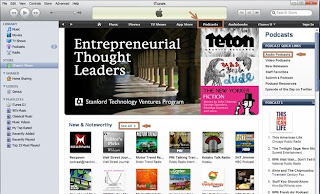
Step 3: Hit subscribe. When the podcasts gets downloaded, copy them to a local folder.
Step 4: Hook up your favorite MP3 player to your laptop and download these podcasts. If you are facing difficulty syncing your podcasts with your device, then you can use software such as “synctoy” [ http://www.microsoft.com/downloads/details.aspx?familyid=c26efa36-98e0-4ee9-a7c5-98d0592d8c52&displaylang=en] to aid you sync the two.
Step 5: You can now enjoy these podcasts in your car by hooking your car stereo to the MP3 player using an Auxiliary cable. If your car stereo does not have an Auxiliary input, you may use other means as suggested in this video. Here is one of the dozens of videos which tells you how to do so. [http://www.youtube.com/watch?v=6ZOd9lqmaZo&feature=related]
I have attempted to simply the steps so that it's easy to follow. Hope this article was easy to follow. Feel free to leave comments if you run into any issues. Happy listening| >_<|
Ever wished you could put the time spent in traffic to good use? If yes then this blog is definitely for you.
Podcast as most of us know are video or audio files which are released periodically. By transferring podcasts to your MP3 player you can have a commercial free entertaining audio experience which will truly appeal to your senses. Here is how you go about it.
Step 1. Install itunes from http://www.apple.com/itunes/overview/. I hope the arrow marks in the pictures below can guide you.
Itunes -> podcasts -> browse podcasts in the iTunes store.

Step 2: Select Audio Podcasts and choose the Podcasts which appeal to you.

Step 3: Hit subscribe. When the podcasts gets downloaded, copy them to a local folder.
Step 4: Hook up your favorite MP3 player to your laptop and download these podcasts. If you are facing difficulty syncing your podcasts with your device, then you can use software such as “synctoy” [ http://www.microsoft.com/downloads/details.aspx?familyid=c26efa36-98e0-4ee9-a7c5-98d0592d8c52&displaylang=en] to aid you sync the two.
Step 5: You can now enjoy these podcasts in your car by hooking your car stereo to the MP3 player using an Auxiliary cable. If your car stereo does not have an Auxiliary input, you may use other means as suggested in this video. Here is one of the dozens of videos which tells you how to do so. [http://www.youtube.com/watch?v=6ZOd9lqmaZo&feature=related]
I have attempted to simply the steps so that it's easy to follow. Hope this article was easy to follow. Feel free to leave comments if you run into any issues. Happy listening| >_<|
Sunday, January 24, 2010
Top 4 websites to track Black Friday deals
A common predicament on the eve of Black Friday is “Do I really have to wake up and stand in the cold to get to catch the best Black Friday deals?” The answer is “No”. Here are a few websites which post most, if not all, of the deals on the web…
BlackFriday.info
DealNews.com
FatWallet.com
GottaDeal.com
Happy shopping =)
BlackFriday.info
DealNews.com
FatWallet.com
GottaDeal.com
Happy shopping =)
Saturday, June 13, 2009
Project NATAL
Microsoft has deiced to take on Wii’s challenge head on with project Natal. Conventional motion capture techniques, require users to carry motion sensors, or require users to stand in a prescribed areas surrounded by cameras. However, the amazing new technology does not require users to wear any sensors and if blogs and rumors are to be believed then there will be only a single camera. This is nothing short of a revolution in the world of motion capture technology since this is really cutting edge. Even brand new technology like the Sixth Sense Technology (see post below) which uses video capture techniques to translate gestures to commands is considered brand new.
Project Natal (wonder what’s with the name) still has a long way to go before it’s made available for consumers. The rumor floating around in blogs is that the console will be available next fall. It will be natural to assume that the console will be compatible with XboX 360. Microsoft has already launched a campaign to increase awareness and generate a buzz amongst gaming enthusiasts. To watch a live demo of the prototype click here.
It will be interesting what is Wii’s response to Microsoft’s challenge. However, for now it seems Microsoft may have a console winner in their hands.
Project Natal (wonder what’s with the name) still has a long way to go before it’s made available for consumers. The rumor floating around in blogs is that the console will be available next fall. It will be natural to assume that the console will be compatible with XboX 360. Microsoft has already launched a campaign to increase awareness and generate a buzz amongst gaming enthusiasts. To watch a live demo of the prototype click here.
It will be interesting what is Wii’s response to Microsoft’s challenge. However, for now it seems Microsoft may have a console winner in their hands.
Sunday, June 7, 2009
Will “Binged” be the new “Googled”?
The short answer is not yet, but it’s definitely gone beyond being the “Yahoo-ed” it, if at all you ever “Yahoo-ed”.
Bing definitely impresses. From a Microsoft perspective it’s definitely got what it’s bargained for much quicker and a lot cheaper than what it had anticipated for. According to Microsoft CEO, Steve Ballmer, Microsoft was planning to have the second most popular search engine in 5yrs and one of the ways they were hoping to do this was by acquiring Yahoo for a whopping $40 Billion. Though it’s still early days, if early trends are anything to go by, Bing has already overtaken Yahoo by a huge margin (Bing has 16% as against Yahoo's 10%).
The features in Bing which stand out are:
- Auto spelling correction.
- Deep Links. If you search for UPS, along with the regular results you will also find, deep links such as "tracking", "Shipping", etc. It also displays the "Customer Contact" number. Very cool.
- Video Playback which is super cool. It play's videos when you just hover the mouse over the video search results.
- Applying AI to categorize searches which is what Bing has been referring to in it’s add, that it is a decision engine and not just a search engine.
Downside:
- Bing has no toolbar
- No alternative to Google.com/trends.
Here are a site - http://www.mixxr.co.uk where you can compare the results of the two search engines. I have been Bing for a week now, and comparing the results with Google and here is my verdict.
News related articles – Google wins.
Image Search – Bing wins
Video Search – Bing wins
Other Search results - It’s a toss up. Both give me what I am looking for.
However, Google seems to to be a tad faster.
At the end of the day, it’s us the users who are the winners because we finally have an alternative to Google.
Bing definitely impresses. From a Microsoft perspective it’s definitely got what it’s bargained for much quicker and a lot cheaper than what it had anticipated for. According to Microsoft CEO, Steve Ballmer, Microsoft was planning to have the second most popular search engine in 5yrs and one of the ways they were hoping to do this was by acquiring Yahoo for a whopping $40 Billion. Though it’s still early days, if early trends are anything to go by, Bing has already overtaken Yahoo by a huge margin (Bing has 16% as against Yahoo's 10%).
The features in Bing which stand out are:
- Auto spelling correction.
- Deep Links. If you search for UPS, along with the regular results you will also find, deep links such as "tracking", "Shipping", etc. It also displays the "Customer Contact" number. Very cool.
- Video Playback which is super cool. It play's videos when you just hover the mouse over the video search results.
- Applying AI to categorize searches which is what Bing has been referring to in it’s add, that it is a decision engine and not just a search engine.
Downside:
- Bing has no toolbar
- No alternative to Google.com/trends.
Here are a site - http://www.mixxr.co.uk where you can compare the results of the two search engines. I have been Bing for a week now, and comparing the results with Google and here is my verdict.
News related articles – Google wins.
Image Search – Bing wins
Video Search – Bing wins
Other Search results - It’s a toss up. Both give me what I am looking for.
However, Google seems to to be a tad faster.
At the end of the day, it’s us the users who are the winners because we finally have an alternative to Google.
Sunday, May 10, 2009
BumpTop
BumpTop is a really cool application created by Anand Agarwal and his team to covert your 2D Desktop to 3D. The laws of physics are applied to make your Desktop as real and cluttered as a work desktop or as organized as a library rack.
In addition to making your desktop standout, it also helps you connect to social networking sites like Twitter or Facebook. The new version is said to have multi-touch feature. The downside is the newer version might require a high end graphics card.
A newer version has come out since this video has come out. Enjoy!! By the way, it will be available to the PC renegades (aka MAC users) soon.
In addition to making your desktop standout, it also helps you connect to social networking sites like Twitter or Facebook. The new version is said to have multi-touch feature. The downside is the newer version might require a high end graphics card.
A newer version has come out since this video has come out. Enjoy!! By the way, it will be available to the PC renegades (aka MAC users) soon.
Sunday, April 12, 2009
Sixth Sense Technology
Sixth Sense Technology is the brain child of Pranav Mistry. Pranav was working with Microsoft in Hyderabad India before heading to US to do his PhD at MIT.
Sixth Sense Technology uses three main components – A camera, a cell-phone and a projector. The user is able perform a plethora of incredible acts using the Sixth Sense Technology. The way these tasks are achieved can be broken down to the three main parts:
Part 1: The user wears colored caps. Gestures made via the fingers containing the caps are caught on camera and processed using Image Capturing and Visual Processing techniques to translate gestures into appropriate actions or commands. The camera also serves another purpose; to capture images of the object of interest.
Part 2: The video stream captured via the camera is then sent to the cell-phone which uses the power of cloud computing to garner relevant information.
Part 3: Projecting the processed information onto a screen using the projector.
The simplicity of the idea of harnessing existing technologies to create something so powerful is truly remarkable. The other amazing thing about the Sixth Sense Technology is the short time span, 5months, in which the project has made such tremendous progress.
Of course it will still be a while before the technology is refined and shaped into a form where it’s marketable, but it’s always exciting to have a glimpse into what the future holds for us.
Sixth Sense Technology uses three main components – A camera, a cell-phone and a projector. The user is able perform a plethora of incredible acts using the Sixth Sense Technology. The way these tasks are achieved can be broken down to the three main parts:
Part 1: The user wears colored caps. Gestures made via the fingers containing the caps are caught on camera and processed using Image Capturing and Visual Processing techniques to translate gestures into appropriate actions or commands. The camera also serves another purpose; to capture images of the object of interest.
Part 2: The video stream captured via the camera is then sent to the cell-phone which uses the power of cloud computing to garner relevant information.
Part 3: Projecting the processed information onto a screen using the projector.
The simplicity of the idea of harnessing existing technologies to create something so powerful is truly remarkable. The other amazing thing about the Sixth Sense Technology is the short time span, 5months, in which the project has made such tremendous progress.
Of course it will still be a while before the technology is refined and shaped into a form where it’s marketable, but it’s always exciting to have a glimpse into what the future holds for us.
Sunday, November 9, 2008
Handy Shortcuts
If you love short cuts when using your PC or notebook them you might find these handy.
IE tips
Goto address bar: Alt+D
Show or Hide the search bar: Ctrl+E
Show or hide History bar: Ctrl+H
Add current page to Favorites: Ctrl+D
Toggle Full screen on or off: F11
Windows Programs
Open a new document: Ctrl+O
Move the cursor to the beginning of a document: Ctrl+Home
Move the cursor to the end of document: Ctrl+End
These shortcuts are the courtesy of “PCWorld”.
Note: I have not included the obvious shortcuts which most of us are aware of. If you would like to know about the whole range of shortcuts, email me or leave a note and I’ll post the remaining shortcuts.
IE tips
Goto address bar: Alt+D
Show or Hide the search bar: Ctrl+E
Show or hide History bar: Ctrl+H
Add current page to Favorites: Ctrl+D
Toggle Full screen on or off: F11
Windows Programs
Open a new document: Ctrl+O
Move the cursor to the beginning of a document: Ctrl+Home
Move the cursor to the end of document: Ctrl+End
These shortcuts are the courtesy of “PCWorld”.
Note: I have not included the obvious shortcuts which most of us are aware of. If you would like to know about the whole range of shortcuts, email me or leave a note and I’ll post the remaining shortcuts.
Sunday, November 2, 2008
A Fundamental Q...
Many of us have wondered often - What is it that gives matter mass?
Matter is supposedly made of 16 elementary particles categorized as Quarks, Leptons & Force Carriers - that are together called the “standard model”. Quarks consist of protons and neutrons and make up the nuclei. Lepton consists of particles such as electrons while Force Carriers are the forces holding the atom together.
The Big Bang states that an infinitely small dense matter expanded rapidly. Gravity separated from the other forces and many new particles were formed including quarks which started to gather mass by passing through the “Higgs field”. As particles gathered mass, matter was created and eventually stars and planets started to form millions of year later.
In short scientists attribute the reason for matter having mass to the “Higgs particle”. Just one problem; unlike the particles of the std model – Higgs particles has never been discovered and this is precisely what the worlds most expensive experiment hopes to discover.
Scientists from CERN (European Organization for Nuclear Research), Russia, Canada, India, Japan and the United States have built a Large Hadron Collider(LHC) - a particle collider. The LHC is 27kms (17miles) in diameter and is constructed bellow the French – Swiss border. The LHC collides protons rotating in opposite direction at 99.999999% the speed of light, using superconducting magnets
The scientists hope that the proton collision will be similar to a miniaturized Big Bang which produced the elementary particles. They hope the elementary particles including the “Higgs Particle” will be formed from the collision and they can learn more about it from the traces collected by the “Particle detectors”. The Scientists also hope to learn more about Anti-matter, Micro-black holes, additional dimensions, etc.
The LHC was inaugurated on 10th Sept 2008 but was shut down due to a soldering problem which is being worked upon.
Matter is supposedly made of 16 elementary particles categorized as Quarks, Leptons & Force Carriers - that are together called the “standard model”. Quarks consist of protons and neutrons and make up the nuclei. Lepton consists of particles such as electrons while Force Carriers are the forces holding the atom together.
The Big Bang states that an infinitely small dense matter expanded rapidly. Gravity separated from the other forces and many new particles were formed including quarks which started to gather mass by passing through the “Higgs field”. As particles gathered mass, matter was created and eventually stars and planets started to form millions of year later.
In short scientists attribute the reason for matter having mass to the “Higgs particle”. Just one problem; unlike the particles of the std model – Higgs particles has never been discovered and this is precisely what the worlds most expensive experiment hopes to discover.
Scientists from CERN (European Organization for Nuclear Research), Russia, Canada, India, Japan and the United States have built a Large Hadron Collider(LHC) - a particle collider. The LHC is 27kms (17miles) in diameter and is constructed bellow the French – Swiss border. The LHC collides protons rotating in opposite direction at 99.999999% the speed of light, using superconducting magnets
The scientists hope that the proton collision will be similar to a miniaturized Big Bang which produced the elementary particles. They hope the elementary particles including the “Higgs Particle” will be formed from the collision and they can learn more about it from the traces collected by the “Particle detectors”. The Scientists also hope to learn more about Anti-matter, Micro-black holes, additional dimensions, etc.
The LHC was inaugurated on 10th Sept 2008 but was shut down due to a soldering problem which is being worked upon.
Tuesday, August 5, 2008
Hello ANDROID!
Finally Google released the demo of Android. Android is an open-source Linux based software platform for mobile devices. The code is in a Java like language that utilizes Java libraries developed by Google. Android will support a variety of connectivity technologies including GSM, CDMA & EV-DO. A number of companies have shown interest in developing Android based smartphones. If I was a programmer working on Android this would freak me out. Just imagine trying to develop a code which has to work across all platforms and simultaneously cater to the needs of a plethora of smart phones from different companies. Now compare this with a team working on Apple’s iPhone. Their task is so much easier because they have to build an OS catering to the needs of a single hardware.
The four layers of the Android are - the Linux Kernel (basically drivers), Libraries, the Application framework (OS management) and finally the Applications themselves. It’s been developed by Google in conjunction with industry leaders like Intel, HTC, Qualcomm, T-Mobile & Wind River Systems. It being open-source means you can create applications for the platform using the Android SDK and win upto $10,000 dollars. Interestingly, the name Android comes from the start up company Android Inc which Google bought. Google has been working closely with T-Mobile and is scheduled to release Anroid based HTC phones in the 4Q of 2008.
The four layers of the Android are - the Linux Kernel (basically drivers), Libraries, the Application framework (OS management) and finally the Applications themselves. It’s been developed by Google in conjunction with industry leaders like Intel, HTC, Qualcomm, T-Mobile & Wind River Systems. It being open-source means you can create applications for the platform using the Android SDK and win upto $10,000 dollars. Interestingly, the name Android comes from the start up company Android Inc which Google bought. Google has been working closely with T-Mobile and is scheduled to release Anroid based HTC phones in the 4Q of 2008.
Sunday, August 3, 2008
DEEP ZOOM and PHOTOSYNTH Technology
Photosynth is a really cool product to come out of the staples of Microsoft Live labs which produces interactive 3-D Images from 2-D images. It also makes use if another really neat technology known as the Deep Zoom technology.
Deep Zoom technology allows users to look at Giga bytes of image data in a seamless fashion. This technology takes a set of tiled images created using a Deep Zoom Composer and will send the user only that portion/tile which he/she wishes to view at any given instant. This is akin to how map quest or google map works.
My limited and simplistic understanding of how Photosynth works is that initially a 3-D physical model of that place is initially simulated. Then key points of the 3-D structure are identified and are pictorially recreated using several overlapping 2-D photos of that key point. Here is a link to better understand how Photosynth technology works. http://labs.live.com/photosynth/videodemo.html.
Having taken Computer courses on Digital Image Processing I can easily think of challenges that can come with combining pictures with varying camera angles, varying picture resolutions, varying light intensity and so on and so forth. But the end product looks great and I guess the practicality of the application is endless. I guess the Orkut or Myspace profiles of the future are going to have Photosynth enabled models rather than mundane 2D pics. I’ll leave it to you to think of more useful places where this marvelous piece of technology can be used
Deep Zoom technology allows users to look at Giga bytes of image data in a seamless fashion. This technology takes a set of tiled images created using a Deep Zoom Composer and will send the user only that portion/tile which he/she wishes to view at any given instant. This is akin to how map quest or google map works.
My limited and simplistic understanding of how Photosynth works is that initially a 3-D physical model of that place is initially simulated. Then key points of the 3-D structure are identified and are pictorially recreated using several overlapping 2-D photos of that key point. Here is a link to better understand how Photosynth technology works. http://labs.live.com/photosynth/videodemo.html.
Having taken Computer courses on Digital Image Processing I can easily think of challenges that can come with combining pictures with varying camera angles, varying picture resolutions, varying light intensity and so on and so forth. But the end product looks great and I guess the practicality of the application is endless. I guess the Orkut or Myspace profiles of the future are going to have Photosynth enabled models rather than mundane 2D pics. I’ll leave it to you to think of more useful places where this marvelous piece of technology can be used
Saturday, July 12, 2008
BMW GINA Concept Car
Apparently this car was developed 6 years ago and was kept in wraps until recently (wonder why!). Though I think it's pretty innovative, I still think GINA (plz change the name) will continue to remain what it is - a concept car.
Wednesday, June 25, 2008
Nokia's Morph Concept
If it wasn't for the video, I probably wouldn't have been able to convey how cool Nokia's Morph Concept is. Nokia's R&D and Cambridge are trying to incorporate nano-technology in electronic devices which will help revolutionalize the way electronic devices operate in the new future. It weaves a 3-D mesh with Fibril proteins, a thin elastic structure is created which creates a highly flexible, stretchable, transparent and strong structure. What's most remarkable is that the material can adapt itself to perform it's task at hand.
It's got built in solar absorption capabilities to re-charge itself. It's surface cliams to be self-cleaning and hence repels water or dirt. To top it all it's made of bio-degradeable materials. So essentially it's got everything to give a environmentalist a mini-orgasm. Cambirdge researchers claim to have all the basic technologies in place but admit they are still no where near creating the first prototype. The rough estimate as to when this might become a reality is around 2018-2020. Tell then enjoy the video...
What's Up!
Like the rest of you(except MAC fans who rejoiced at its failure) I was disappointed with Vista as well. However, I am really excited about Vista's successor Windows 7 (formerly called Vienna) which is due to launch in late 2009(yup...already). So why am I excited? Coz it's the first full-fledged PC OS to be released which has multi-touch feature.
Multi-touch is a feature which essentially allows direct human-computer interaction while keeping traditional input devices like mouse and keyboard out of the loop. Over the span of the last few years different techniques have been used to achieve multi-touch functionality - finger pressure, high speed camera captures, capacitive technique or infrared in conjunction with advanced image processing. For instance the Capacitive technique uses the capacitive nature of our body and the capacitive material on the surface to cause distortions in the reference field to pass positional information.
Here is a sneek peek at Windows 7
Video: Multi-Touch in Windows 7
Pretty cool right...maybe it's the harbinger of times to come when even even the office whiteboard will have multi-touch feature in them.
Multi-touch is a feature which essentially allows direct human-computer interaction while keeping traditional input devices like mouse and keyboard out of the loop. Over the span of the last few years different techniques have been used to achieve multi-touch functionality - finger pressure, high speed camera captures, capacitive technique or infrared in conjunction with advanced image processing. For instance the Capacitive technique uses the capacitive nature of our body and the capacitive material on the surface to cause distortions in the reference field to pass positional information.
Here is a sneek peek at Windows 7
Video: Multi-Touch in Windows 7
Pretty cool right...maybe it's the harbinger of times to come when even even the office whiteboard will have multi-touch feature in them.
Subscribe to:
Posts (Atom)